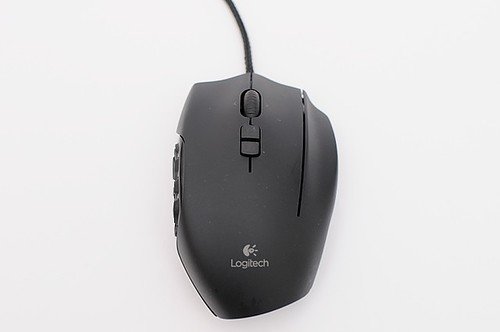
Owners keep the G600 as a set-it-once MMO mouse whose settings travel with it, and several hold on to theirs for years because they see few alternatives they like better.
Read from 14 owner accountsUpdated October 16, 2026Thin evidence: 14 owner accounts so far, fewer than the 40 we want before we trust a pattern.Owner rating: none yetAdd yoursCompare it
What keeps coming up
Button mappings and macros save to the mouse itself, so it works the same on any PC without installing drivers or companion software. Only a few accounts raise this, but none of them are negative about it.
After years of use, the buttons can start registering double clicks. Very few accounts mention it, too few for a verdict, but both owners who did described their mice starting to double click at around the five-year mark.
The Logitech G600 is a wired gaming mouse made for MMO and other games that use a lot of keyboard shortcuts. It has a grid of buttons under your thumb so you can trigger skills and macros without reaching for the keyboard. It is meant for right-handed players.
Specs
Connection
Wired USB (USB 2.0), 2.1 m (7 ft) cable
Battery life
Switches or sensor
Laser sensor
Polling rate and DPI
200 to 8,200 DPI
Weight
133 g (4.7 oz)
Layout and buttons
Programmable keys G7 to G20 plus a third-finger button on top; 1 onboard profile with 3 modes
Warranty
From the maker's spec page, checked October 10, 2026. A blank row means the maker does not state it.
What the specs mean
It plugs in with a cable, so it never needs charging and has no wireless lag. You can set the speed anywhere from very slow (200 DPI) to very fast (8,200 DPI), so it works on small and very large screens. At 133 g it is on the heavy side for a gaming mouse, so it feels solid but takes more effort to flick around fast. It saves one set of button settings in the mouse itself, so your layout comes with you to another computer.
Compare the G600 with…
Pick up to three. You get a page with just those,
side by side, on the subjects owners raised.
What people still like after years is how little attention it needs. You configure it once and the setup stays on the mouse. One owner who moved to a newer, software-heavy mouse said they miss that simplicity. Others call it good value for what they paid, and one owner said they love it and wish they could keep it forever.
Holding on to it has become a habit for some owners, partly because they find the MMO mouse market thin. One owner has two G600s. Another keeps one alongside a Naga Pro and is eager for any new competitor. What they have had to accept is age: owners talk about their mice slowly wearing out and say they are watching for a replacement with a similar ring finger button.
Reliability & repairs
Some units last a long time. One owner bought theirs in 2013 and says it still works, though they no longer use it. Others got about five years before problems appeared, mainly double clicking and, in one case, a scroll wheel that stopped working. That owner still felt the mouse had done its job for the money. Not every unit lasted that long: one owner's side buttons became unreliable within a few months, and after a month of troubleshooting Logitech support stopped replying. On the fix side, one owner is building custom firmware (QMK, compatible with VIA) to keep running the mouse and its side panel, and others plan to replace theirs with a newer MMO mouse.
The long-term evidence here is thin. Each theme rests on only a handful of accounts, too few for the site to give any of them a verdict, and the scroll wheel accounts point in different directions. Take these patterns as early signals, not settled findings.
Parts named in the 16 accounts that describe a failure
button switches (double clicking)2 of 16
mouse button (double-click)1 of 16
scroll wheel1 of 16
side buttons1 of 16
click switches / 9 button1 of 16
Lifespan
When it breaks16 of 33 accounts describe a failure, at a median of 3.5 years.
What breaks firstNamed most: button switches (double clicking) (2 of 16), mouse button (double-click) (1 of 16), scroll wheel (1 of 16).
Still going13 say theirs still works after a year or more. The longest: 16 years.
More detail What owners praise, where they are split, and the
follow-up timeline
What owners praise
Nothing with a clear majority yet. Owners who raised these subjects were split, or too few to judge.
Nothing has a clear majority against it yet. Counted from the owners who raised each subject, not from everyone. A subject is judged once at least 4 owners raise it.
11 more subjects came up from fewer than 4 owners each, which is not enough for a fair reading. To see how it stacks up, compare it with another machine.
Does it still kick?
The same owner, asked again at each point. Fills in as owners answer.
Own this one?
Two questions: how long you have had it, and anything you would
like to say about it. Then we ask again as it ages. This helps our
mission.
Still good used? What a used buyer should know, from owners a year or more in
Among the 33 owner accounts here that gave a duration, 16 described a failure. Parts named most: button switches (double clicking), mouse button (double-click), scroll wheel, side buttons.
Before you buy one used, ask the seller: how old it is, whether it was ever repaired and by whom, and whether any of the parts above have been replaced. Ask to see it run. A receipt tells you the warranty start date; most makers honour the term only for the first owner.
Where this came from
Where this came from
Public discussions we read and summarised in our own
words. Nothing here was submitted to Still Kicks.
Counted from public accounts by people who said they own it, and summarised by Still Kicks in its own words. Not a manufacturer claim, a lab test or an estimate.
No account needed to look. Sign in with Google only if you want to track something you own.