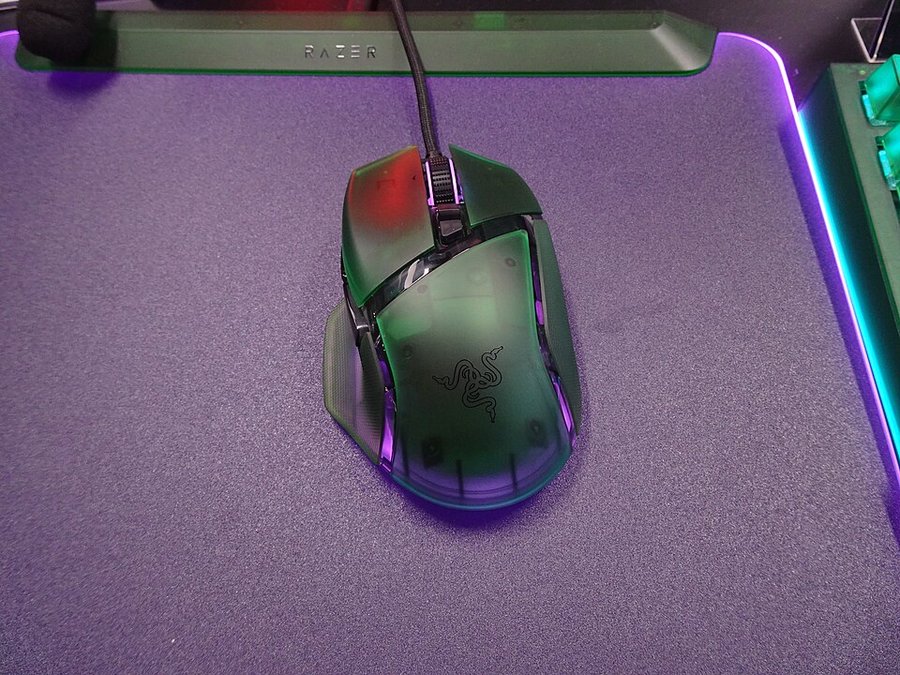
Owners keep the Basilisk V3 Pro as a hybrid mouse that covers both work and gaming, accepting some extra weight and a less refined scroll wheel for its shape and performance.
Read from 15 owner accountsUpdated October 10, 2026Thin evidence: 15 owner accounts so far, fewer than the 40 we want before we trust a pattern.Owner rating: none yetAdd yoursCompare it
What keeps coming up
Owners are divided on the weight. On the positive side, owners describe it at 112 grams as a hybrid that works for both gaming and productivity, and one who also uses the MX Master points out that it is clearly lighter than that series.
The weight is also where the reservations sit, and opinion on it is divided. Next to other Razer mice, some owners find it on the heavy side, and one says it is smaller in height and width and less ergonomic than an MX Master 3S.
The Razer Basilisk V3 Pro is a wireless gaming mouse shaped for the right hand. It has a tilting scroll wheel and RGB lighting, and it suits players who want a lot of buttons and a mouse that also works for everyday computer use.
Specs
Connection
Razer HyperSpeed Wireless (USB dongle), Bluetooth, wired USB Type-C
Battery life
Up to 110 hours (HyperSpeed), 32 hours (HyperPolling dongle), 150 hours (Bluetooth)
Switches or sensor
Razer Focus Pro 30K optical sensor; Razer Optical Mouse Switches Gen-3 (rated 90 million clicks)
Polling rate and DPI
Up to 8000 Hz wireless with HyperPolling dongle (sold separately); up to 30,000 DPI
From the maker's spec page, checked October 10, 2026. A blank row means the maker does not state it.
What the specs mean
You can expect several weeks of normal play from one charge on the USB dongle. Bluetooth lasts longer, and the fast 8000 Hz mode drains the battery much sooner. 30,000 DPI is far more than most people use, so the sensor won't hold you back. At 112 g it's a fairly heavy mouse, which suits a steady palm grip better than fast flick aiming.
Compare the Basilisk V3 Pro with…
Pick up to three. You get a page with just those,
side by side, on the subjects owners raised.
What keeps people using it is how it works across their day. One owner has had it since launch and switches between productivity and gaming on it. Another says it beats their MX Master 4 on comfort, performance and click consistency, and is glad Razer's software runs on Mac again. The magnetic charging stand gets mentioned as a nice touch. One long-time ergo mouse user puts shape ahead of weight: they tried a much lighter Viper V4 Pro and got hand cramps, while the Basilisk keeps their fingertip grip comfortable.
The scroll wheel is what owners adjust to. Owners who also have an MX Master find the Basilisk wheel too light. They also notice a short delay when the free-spin mode locks back into notched scrolling. One owner says outright that the MX Master has the nicer wheel and still rates the Basilisk as the better mouse overall.
Reliability & repairs
The core of the mouse seems to last. One owner is still using it after owning it since launch, and another stayed with the line after owning the Gen 1 Ultimate before it. Nobody in these accounts reports the clicks, sensor or charging failing.
The one fault raised is an intermittent problem with the scroll wheel. The owner thinks it is a software issue because it does not happen all the time, and they did not say how they fixed it. Long-term accounts are thin here. Very few owners describe years of use, so there is not enough to say how the wheel, the battery or the switches hold up over time.
Lifespan
When it breaks1 of 3 accounts describe a failure, at a median of 6 months.
What breaks firstNamed most: USB dongle (1 of 1).
Still going1 say theirs still works after a year or more. The longest: 3 years.
More detail What owners praise, where they are split, and the
follow-up timeline
What owners praise
Nothing with a clear majority yet. Owners who raised these subjects were split, or too few to judge.
Where owners are split
weight0 for · 2 against · 3 mixedof 5 who raised it
Nothing has a clear majority against it yet. Counted from the owners who raised each subject, not from everyone. A subject is judged once at least 4 owners raise it.
18 more subjects came up from fewer than 4 owners each, which is not enough for a fair reading. To see how it stacks up, compare it with another machine.
Does it still kick?
The same owner, asked again at each point. Fills in as owners answer.
Own this one?
Two questions: how long you have had it, and anything you would
like to say about it. Then we ask again as it ages. This helps our
mission.
Still good used? What a used buyer should know, from owners a year or more in
Among the 3 owner accounts here that gave a duration, 1 described a failure. Parts named most: USB dongle.
Before you buy one used, ask the seller: how old it is, whether it was ever repaired and by whom, and whether any of the parts above have been replaced. Ask to see it run. A receipt tells you the warranty start date; most makers honour the term only for the first owner.
Where this came from
Where this came from
Public discussions we read and summarised in our own
words. Nothing here was submitted to Still Kicks.
Counted from public accounts by people who said they own it, and summarised by Still Kicks in its own words. Not a manufacturer claim, a lab test or an estimate.
No account needed to look. Sign in with Google only if you want to track something you own.